
Spec-Driven Development for AI Coding: The Complete Guide

Spec-Driven Development (SDD) transforms vibe coding into predictable builds. Learn functional vs technical specs, the artifact stack, and workflows for Cursor, Cline, and v0.
TL;DR: Spec-Driven Development (SDD) means generating authoritative documentation before code. Not sure if you're ready? Run the Spec Readiness Score.
Table of Contents
- What is Spec-Driven Development?
- SDD vs Vibe Coding
- The Core Principle
- Functional vs Technical Specs
- The SDD Artifact Stack
- SDD Workflow for AI Tools
- Context Ark + Cursor Workflow
- Context Ark + Cline Workflow
- Common Mistakes
- Free Templates
What is Spec-Driven Development?
Spec-Driven Development (SDD) is a methodology where you generate comprehensive specifications before writing any code. These specs become the "source of truth" that AI coding tools reference.
The SDD Equation
Complete Specs + AI Context = Reliable Code
Instead of prompting AI with vague requests and hoping for the best, you:
- Generate a complete spec pack (PRD, API spec, schema, architecture)
- Feed that pack to your AI tool as context
- Prompt against the specs ("implement the /api/users endpoint from the API spec")
- Validate output against the same specs
Why Now?
AI coding tools (Cursor, Cline, v0, Lovable, Windsurf) are powerful but context-starved. They hallucinate because they don't know your app's actual structure. SDD solves this by giving them authoritative documentation.
TL;DR for this section: SDD = specs before code. AI tools reference specs instead of guessing.
SDD vs Vibe Coding
Vibe coding meaning is the default mode: prompt AI with loose descriptions, iterate on output, fix hallucinations as you go.
| Aspect | Vibe Coding | Spec-Driven Development |
|---|---|---|
| Starting point | Idea in your head | Documented spec pack |
| AI context | None or minimal | Full project specs |
| Hallucination rate | High (30-60% of outputs) | Low (<10%) |
| Rework cycles | Many (3-10 per feature) | Few (1-2 per feature) |
| Scalability | Breaks around 10K LOC | Scales to 100K+ LOC |
| Team handoff | Nightmare | Smooth |
| Documentation | Absent or outdated | Always current |
When Vibe Coding Works
- Prototypes (throwaway code)
- Solo projects under 1,000 LOC
- Exploration / learning
When SDD is Required
- Production apps
- Team projects (any size)
- Anything you'll maintain > 30 days
- Code that handles money, auth, or user data
- Essential for AI for product managers and teams.
TL;DR for this section: Vibe coding is fast but fragile. SDD is reliable and scalable.
The Core Principle
The SDD core principle:
"AI tools can only be as good as the context you give them."
If you give them nothing, they invent. If you give them specs, they implement.
The Context Hierarchy
1. Global rules (coding standards, patterns)
2. Project context (architecture, tech stack)
3. Feature specs (PRD, acceptance criteria)
4. Implementation specs (API, schema, components)
5. Task context (specific file, specific function)
SDD ensures layers 1-4 exist before you ask for layer 5.
TL;DR for this section: AI tools implement what you document. No docs = inventions. Specs = reliability.
Functional vs Technical Specs
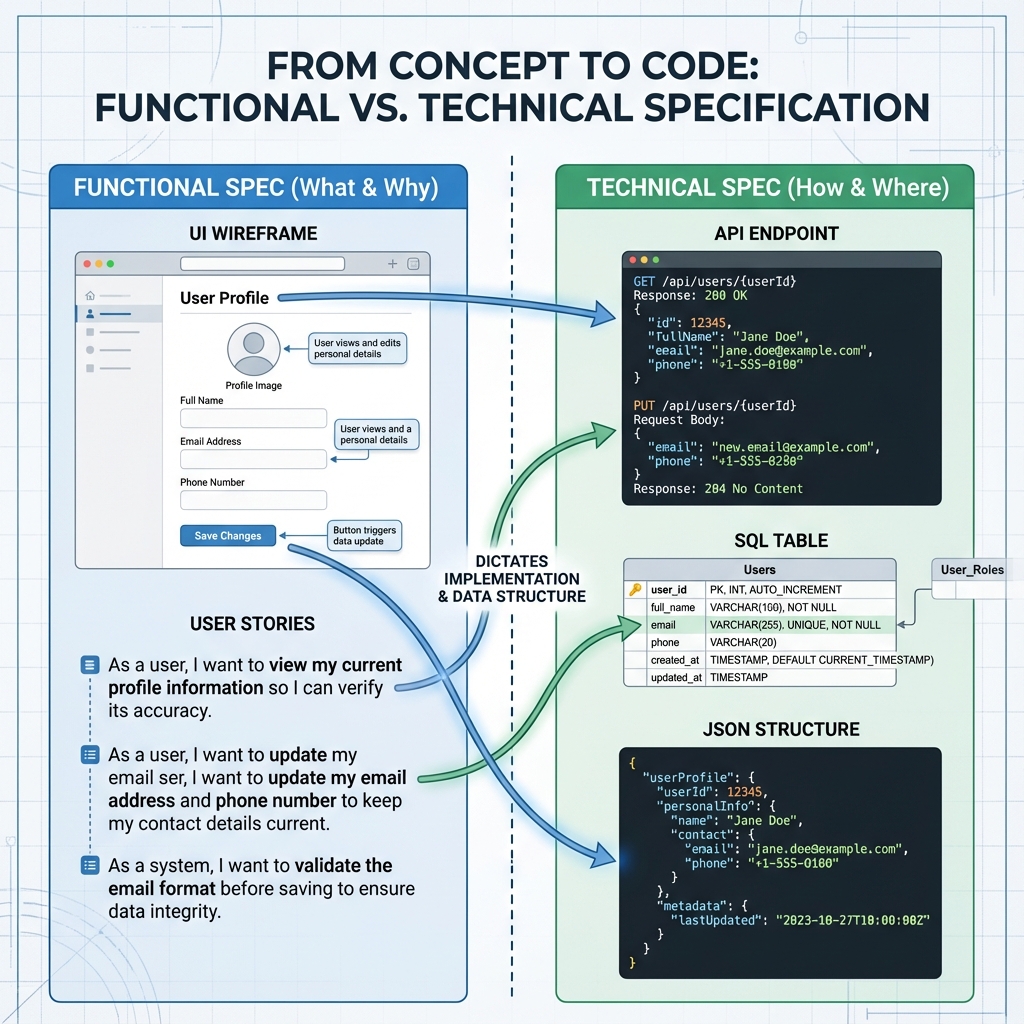
Functional specs define the 'what', while technical specs define the 'how'.
Functional Specs (The "What")
Define what the system should do from the user's perspective:
- PRD (Product Requirements Document): Features, user stories, acceptance criteria
- UX Flows: Wireframes, user journeys, interaction patterns
- Business Rules: Validation logic, calculations, permissions
Technical Specs (The "How")
Define how the system implements the functional requirements:
- API Spec: Endpoints, payloads, authentication
- Database Schema: Tables, columns, relationships
- Architecture Doc: Components, integrations, data flow
- Component Inventory: UI components, props, states
The Separation Problem
Martin Fowler noted that separating functional and technical specs is one of the "hard problems" in SDD tools. Many tools conflate them, leading to specs that are neither good requirements nor good designs.
Context Ark's Approach
Context Ark generates both layers with clear separation:
| Layer | Artifacts |
|---|---|
| Functional | PRD, Scope Lock, User Stories, Acceptance Criteria |
| Technical | API Spec, Database Schema, Architecture Doc, Component Inventory |
The functional specs are stable (change rarely). The technical specs evolve (change with implementation decisions).
TL;DR for this section: Functional = what users see. Technical = how it's built. Keep them separate.
The SDD Artifact Stack
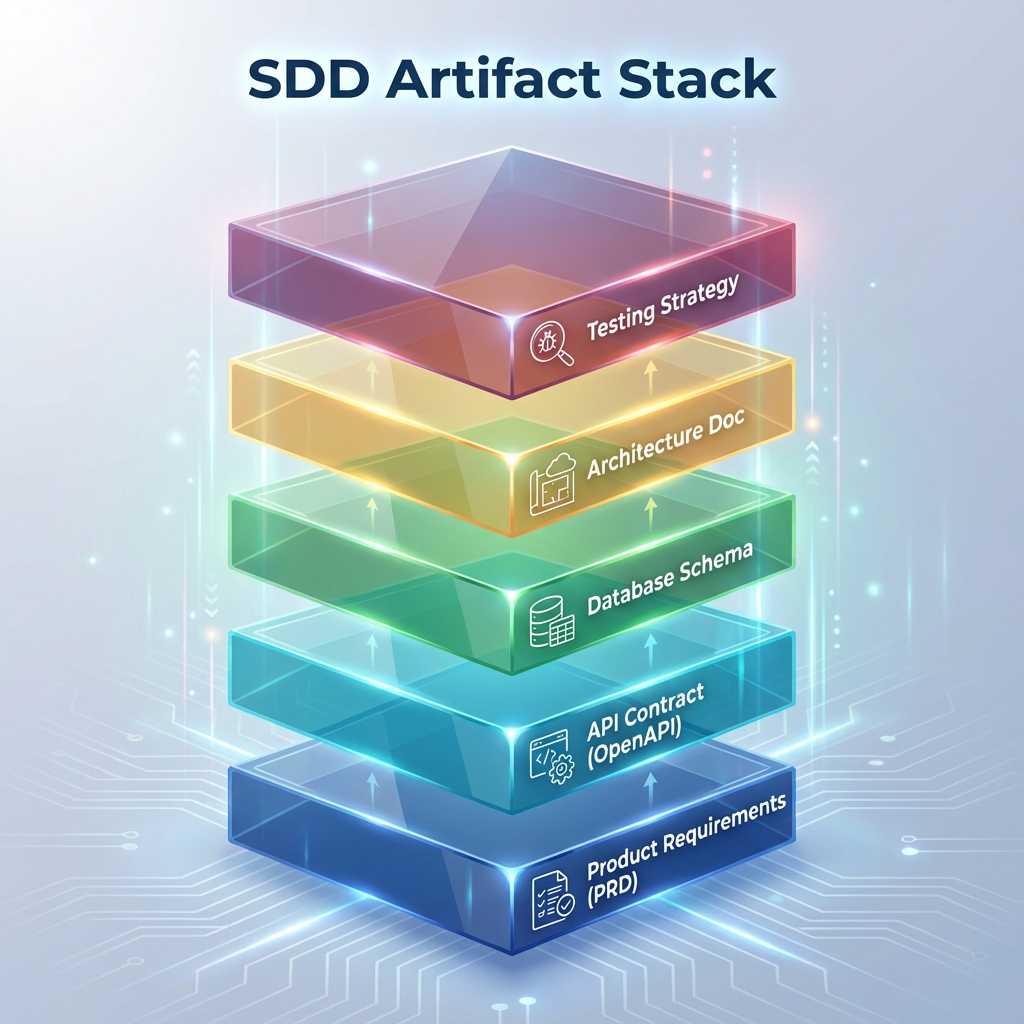
The complete stack of artifacts needed to prevent AI hallucinations.
A complete SDD implementation requires these artifacts:
Tier 1: Foundation (Required)
| Artifact | Purpose | Prevents |
|---|---|---|
| PRD document | Scope lock (use PRD generator) | Scope creep, invented features |
| API Spec | Endpoint contracts (OpenAPI) | Wrong endpoints, bad payloads |
| Database Schema | Tables, columns, relationships | Wrong columns, missing relations |
Tier 2: Architecture (Required for teams)
| Artifact | Purpose | Prevents |
|---|---|---|
| Architecture Doc | System components, data flow | Pattern mismatch, wrong integrations |
| Tech Stack Doc | Frameworks, versions, dependencies | Wrong tech, version conflicts |
| Component Inventory | UI components, props, states | Inconsistent UI, duplicate components |
Tier 3: Operations (Required for production)
| Artifact | Purpose | Prevents |
|---|---|---|
| Deployment Playbook | How to ship, environments | Deploy failures, env mismatches |
| Security Spec | Auth, permissions, data handling | Security holes, compliance issues |
| Observability Spec | Logging, monitoring, alerting | Silent failures, blind debugging |
Context Ark's 60 Docs
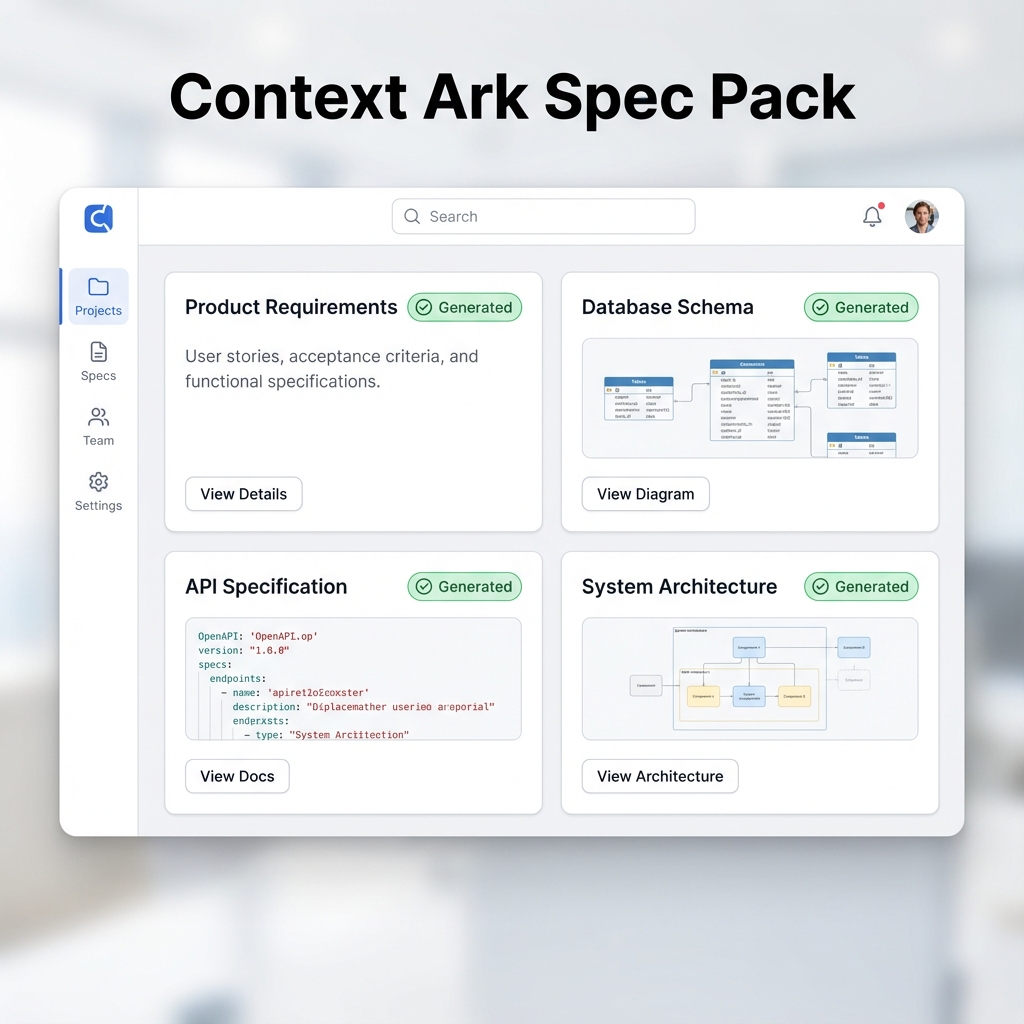
Context Ark generates 60 artifacts across all three tiers from a single brain dump. This ensures no gaps in your spec coverage.
TL;DR for this section: Full SDD needs 9-15 core artifacts. Gaps in coverage = specific hallucination types.
SDD Workflow for AI Tools
The general SDD workflow for any AI coding tool:
Phase 1: Generate Specs
Brain Dump → Intake Questions → Kernel Build → Doc Generation
Output: Complete spec pack (PRD, API, Schema, Architecture, etc.)
Phase 2: Configure Tool
- Add spec files to the tool's context path
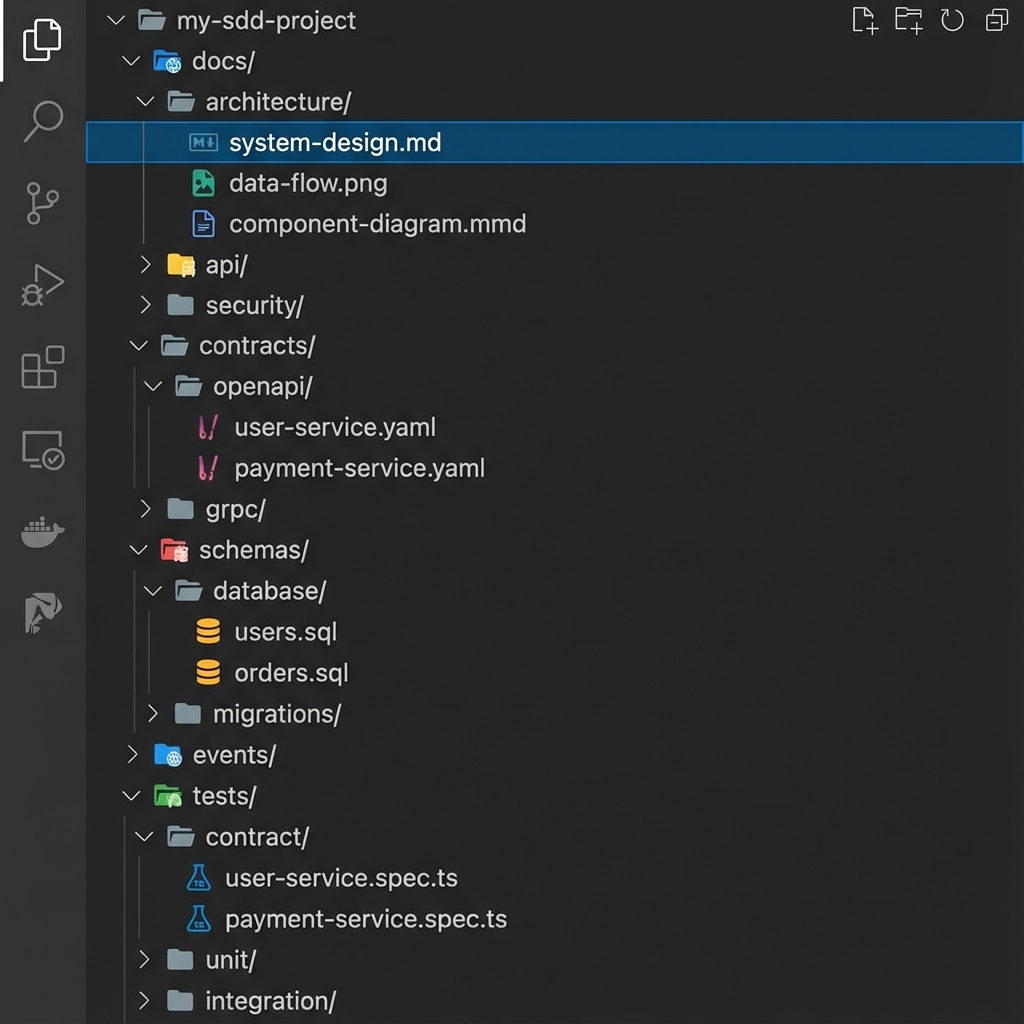
Organize your artifacts clearly so AI tools can find them.
- Configure rules/instructions referencing specs
- Set up file references (@file syntax)
Phase 3: Prompt Against Specs
Bad:  "Create a user signup flow"
Good: "Implement the POST /api/auth/signup endpoint from the API spec in @api-spec.yaml"
Phase 4: Validate Output
- Check API calls match spec
- Check database queries use real columns
- Check imports exist
- Check scope maintained
Phase 5: Update Specs
When implementation reveals needed changes:
- Update the spec first
- Then update the code
- Specs remain source of truth
TL;DR for this section: Generate → Configure → Prompt → Validate → Update. Specs stay current.
Context Ark + Cursor Workflow
Setup
- Generate spec pack from Context Ark
- Export to your repo's root
- Add to
.cursor/rules/:
## Project Context

This project uses Spec-Driven Development. All implementations must:

1. Reference the specs in /docs/ before implementing
2. Follow the patterns in architecture.md
3. Use only endpoints defined in api-spec.yaml
4. Query only columns defined in schema.sql

When implementing any feature, first check:

- @docs/prd.md for scope and acceptance criteria
- @docs/api-spec.yaml for endpoint contracts
- @docs/schema.sql for database structure
Prompting
Use @file references:
Using @docs/api-spec.yaml, implement the GET /api/projects/{id} endpoint.
Include error handling per the error spec.
Validation
After each generation:
Check this implementation against @docs/api-spec.yaml:
- Are the response shapes correct?
- Are all error codes handled?
- Is auth implemented per spec?
Context Ark + Cline Workflow
Setup
- Generate spec pack from Context Ark
- Create
.clinerules:
## Cline Project Rules

## Context Loading

Before any implementation, load and reference:

- /docs/prd.md
- /docs/api-spec.yaml
- /docs/schema.sql
- /docs/architecture.md

## Implementation Rules

1. Only implement features in the PRD
2. Only use endpoints in the API spec
3. Only query columns in the schema
4. Follow patterns in architecture doc

## When Uncertain

Ask for clarification rather than inventing.
Reference the spec section that's unclear.
Prompting
Be explicit about spec references:
Implement the user signup flow.
Reference: PRD Section 3.2 (User Onboarding)
Endpoint: POST /api/auth/signup from api-spec.yaml
Schema: users table from schema.sql
Common Mistakes
1. Specs Too Vague
❌ "The app should be fast" ✅ "API responses < 200ms p95, page load < 2s"
2. Specs Not Available to AI
❌ Specs in Notion, code in repo ✅ Specs in repo, referenced in prompts
3. Specs Outdated
❌ Wrote specs, never updated ✅ Update specs when implementation changes
4. Skipping Validation
❌ AI generated → shipped ✅ AI generated → validated against spec → shipped
5. Mixing Functional/Technical
❌ PRD includes database column names ✅ PRD describes features; schema describes columns
6. No Non-Goals
❌ "Build a project management tool" ✅ "Build project management. NON-GOAL: real-time collaboration"
TL;DR for this section: Common fails: vague specs, inaccessible specs, outdated specs, skipped validation, no non-goals.
Free Templates
Start your SDD journey with these templates:
Template Packs
- Spec-Driven Development Template Pack – Full SDD starter kit
- PRD Template for AI Apps – Scope lock + user stories
- API Spec Template (OpenAPI) – Endpoint contracts
Workflow Guides
Tools
- Spec Readiness Score – Check your spec coverage
Next Steps
- Download the template pack: SDD Templates
- Generate specs for your next project: Use Context Ark or the templates
- Configure your AI tool: Add specs to context
- Start prompting against specs: Reference specific sections
- Validate everything: Never ship without checking
Ready to stop vibe coding? Generate your spec pack →
Last updated: January 2026
Context Ark Team
Writing about AI, documentation, and developer tools
Turn Brain Dumps into PRDs
Don't let AI guess your requirements. Generate a structured PRD with acceptance criteria instantly.