
How to Stop AI From Hallucinating Code (2026 Fix)
AI coding tools invent functions, APIs, and schemas that don't exist. Here's the taxonomy of hallucination types and how to prevent each one with spec-driven development.
TL;DR: AI hallucinations happen when the tool lacks context. Each hallucination type maps to a missing document. Add the right spec, and the hallucination stops.
Before you debug: Check your hallucination risk with the Spec Readiness Score.
Table of Contents
- What Are AI Hallucinations in Code?
- The 8 Hallucination Types
- Type 1: Phantom APIs
- Type 2: Wrong Columns
- Type 3: Fake Imports
- Type 4: Scope Creep
- Type 5: Pattern Mismatch
- Type 6: Wrong Tech
- Type 7: Imagined Config
- Type 8: Bonus Features
- The Prevention Stack
- Free Resources
What Are AI Hallucinations in Code?
AI hallucinations occur when coding tools (Cursor, Cline, v0, Copilot) generate code that references things that don't exist:
- API endpoints that aren't defined
- Database columns that aren't in your schema
- Functions imported from packages that don't export them
- Configuration variables that don't exist
Why They Happen
AI tools are trained on millions of codebases. When prompted without context, they pattern-match against that training data and fill gaps with plausible inventions.
No Context + Pattern Matching = Confident Hallucination
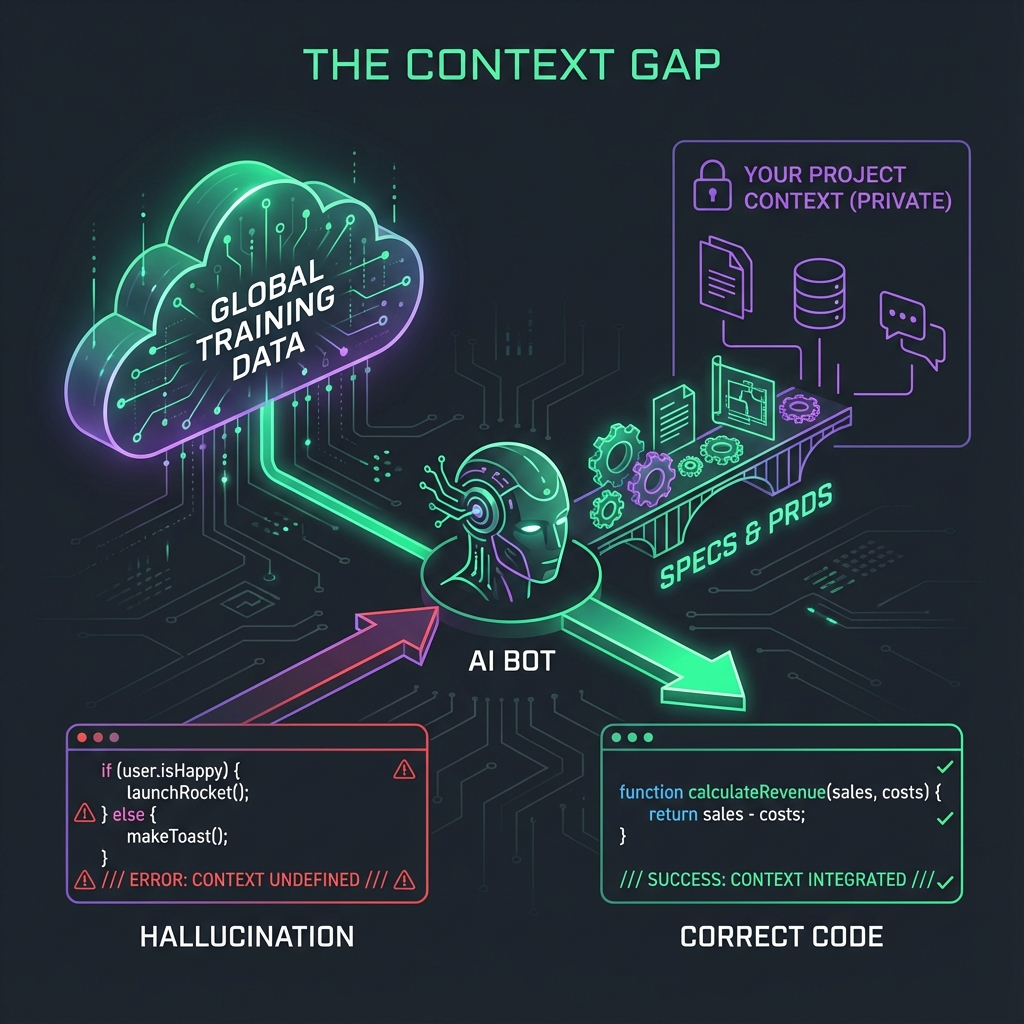
The output looks real. It often compiles. But it doesn't work.
The Cost
| Impact | Time Lost |
|---|---|
| Debug phantom import | 1-2 hours |
| Rewrite wrong API call | 2-4 hours |
| Fix schema mismatch | 4-8 hours |
| Undo architecture confusion | 1-2 days |
The 8 Hallucination Types
Every AI code hallucination falls into one of 8 categories:
| Type | Example | Missing Doc |
|---|---|---|
| Phantom API | Calls /api/users/sync (doesn't exist) |
API Spec |
| Wrong Columns | Queries user_name (column is name) |
Database Schema |
| Fake Imports | import { useAuth } from '@/lib/auth' (doesn't exist) |
Architecture Doc |
| Scope Creep | Adds real-time chat (not in requirements) | PRD with non-goals |
| Pattern Mismatch | Mixes REST + GraphQL | Architecture Doc |
| Wrong Tech | Uses MongoDB syntax in PostgreSQL | Tech Stack Doc |
| Imagined Config | References STRIPE_KEY (undefined) |
Environment Spec |
| Bonus Features | Implements "nice to have" as required | PRD scope lock |
Type 1: Phantom APIs
Symptom
AI generates code calling an endpoint that doesn't exist:
// AI generated this
const response = await fetch("/api/users/sync", { method: "POST" });
But /api/users/sync was never created.
Root Cause
AI saw similar patterns in training data and assumed you have this endpoint.
Fix: API Spec
Create an OpenAPI spec listing every endpoint:
paths:
  /api/users:
    get: ...
    post: ...
  /api/users/{id}:
    get: ...
Reference in prompts:
Using @api-spec.yaml, implement user fetching.
ONLY use endpoints defined in the spec.
→ Download API Spec Template. Remember: PRD is only step one.
Type 2: Wrong Columns
Symptom
AI queries columns that don't exist:
-- AI generated this
SELECT user_name FROM users WHERE active = true;
But your table has name not user_name, and no active column.
Root Cause
AI guessed column names based on common patterns.
Fix: Database Schema Doc
Document exact column names:
CREATE TABLE users (
  id UUID PRIMARY KEY,
  name TEXT NOT NULL,  -- Not "user_name"
  status TEXT,         -- Not "active"
  created_at TIMESTAMPTZ
);
Reference in prompts:
Using @schema.sql, write a query to get active users.
Check: the column is "status", not "active".
Type 3: Fake Imports
Symptom
AI imports functions that don't exist:
// AI generated this
import { useAuth, usePermissions } from "@/lib/auth";
But @/lib/auth doesn't export usePermissions.
Root Cause
AI assumed common auth patterns from other codebases.
Fix: Architecture Doc
Document your actual exports:
## /lib/auth

Exports:

- `useAuth()` - Returns current user
- `signIn(email, password)` - Login
- `signOut()` - Logout

Does NOT export:

- `usePermissions` (does not exist)
- `useRoles` (does not exist)
Type 4: Scope Creep
Symptom
AI adds features you didn't ask for:
// Prompt: "Add user profile editing"
// AI also creates:
// - Avatar upload system
// - Social links section
// - Activity feed
Root Cause
AI extrapolates from "profile" to include everything profiles usually have.
Fix: PRD with Non-Goals
Explicit non-goals stop this:
## Out of Scope (NOT Building)

- [ ] Avatar upload (use Gravatar for MVP)
- [ ] Social links
- [ ] Activity feeds
- [ ] Profile sharing
→ Download PRD Template or use the free PRD generator.
Type 5: Pattern Mismatch
Symptom
AI mixes incompatible patterns:
// File 1: REST
const data = await fetch("/api/users");

// File 2: GraphQL (same project!)
const { data } = useQuery(GET_USERS);
Root Cause
AI doesn't know which pattern your project uses.
Fix: Architecture Doc
State your patterns explicitly:
## API Patterns

This project uses:

- REST (NOT GraphQL)
- Server components (NOT client-side fetching)
- tRPC for type-safe calls

NEVER use:

- GraphQL
- SWR or React Query (use Server Components)
Type 6: Wrong Tech
Symptom
AI uses wrong technology syntax:
// Your stack: PostgreSQL
// AI generates MongoDB syntax:
await db.collection("users").insertOne({ name });
Root Cause
AI pattern-matched to a different database technology.
Fix: Tech Stack Doc
## Tech Stack

| Category | Technology           | Version |
| -------- | -------------------- | ------- |
| Database | PostgreSQL           | 15      |
| ORM      | Prisma               | 5.x     |
| Queries  | Raw SQL via Supabase | -       |

NOT using:

- MongoDB
- Mongoose
- Drizzle
Type 7: Imagined Config
Symptom
AI references environment variables that don't exist:
// AI generated
const stripeKey = process.env.STRIPE_SECRET_KEY;
But STRIPE_SECRET_KEY isn't in your .env.
Fix: Environment Spec
Document your actual env vars:
## Environment Variables

| Variable       | Purpose             | Required |
| -------------- | ------------------- | -------- |
| DATABASE_URL   | Supabase connection | Yes      |
| OPENAI_API_KEY | LLM calls           | Yes      |
| RESEND_API_KEY | Email               | Yes      |

NOT defined:

- STRIPE\_\* (not using Stripe yet)
Type 8: Bonus Features
Symptom
AI implements "nice to have" as if required:
// Prompt: "Create task list"
// AI implements:
// - Drag-and-drop reordering
// - Subtasks
// - Time tracking
// - Recurring tasks
Root Cause
AI doesn't distinguish MVP from full product.
Fix: Strict Scope Lock
## Scope Lock

### MVP (This Version)

- [x] Create tasks
- [x] Mark complete
- [x] Delete tasks

### NOT MVP

- Drag-and-drop (v2)
- Subtasks (v2)
- Time tracking (v3)
- Recurring (v3)
The Prevention Stack
Each hallucination type requires a specific document:
| Hallucination | Prevention Document |
|---|---|
| Phantom API | API Spec Template |
| Wrong Columns | Schema Template |
| Fake Imports | Architecture Doc |
| Scope Creep | PRD Template |
| Pattern Mismatch | Architecture Doc |
| Wrong Tech | Tech Stack Doc |
| Imagined Config | Environment Spec |
| Bonus Features | PRD Scope Lock |
Minimum Viable Prevention
At minimum, create:
- PRD with explicit non-goals
- API Spec with all endpoints
- Database Schema with all tables/columns
These three prevent 80% of hallucinations.
Free Resources
Templates
Guides
Tools
- Spec Readiness Score — Check your hallucination risk
- PRD Generator — Create your first PRD for free
- PRD vs FRD vs BRD — Which requirement doc do you need?
Zero hallucinations starts with complete specs. Generate yours →
Last updated: January 2026
Context Ark Team
Writing about AI, documentation, and developer tools
Is your spec ready for AI?
Vibe coding fails when context is missing. Get a readiness score and find out what you're forgetting.