How to Build an App in 2026 (Step-by-Step Guide)

Learn how to make an app from scratch. Complete guide covering how to create an app, develop mobile apps, build applications, and design apps with AI assistance. Includes cost breakdown, timeline, and step-by-step tutorial.
Quick Answer: To build an app in 2026, you need to: (1) Define your idea, (2) Research the market, (3) Generate a Spec Pack, (4) Choose your AI or code tools, (5) Design and build, (6) Test, and (7) Launch. This guide covers the modern, spec-driven approach to app development.
Whether you want to make a mobile app, create an application, or develop mobile apps for your business, this comprehensive guide shows you exactly how to do it—from initial idea to app store launch.
Table of Contents
- Can Anyone Learn How to Make an App?
- How Hard Is It to Make an App?
- The 10-Step Process to Create an App
- How to Make a Mobile App vs Web App
- How Much Does It Cost to Build an Application?
- How Long Does It Take to Develop an App?
- Ways to Create Apps: Your Development Options
- The "Spec Pack": Your Secret Weapon
- How to Code an App (With AI Assistance)
- How to Design an App That Users Love
- How to Start an App Project Today
- Common Mistakes When Making Apps
- Step-by-Step Tutorial: Build Your First App
- Mobile App Development Tips
- FAQs: How Do You Make an App?
Can Anyone Learn How to Make an App?
Yes. Thanks to modern tools, anyone can learn how to create an app—even without coding experience.
Who Can Make Apps Today
| Background | Best Approach | Timeline |
|---|---|---|
| No coding experience | No-code platforms or AI tools | 2-6 weeks |
| Some programming knowledge | AI-assisted coding (Cursor, Cline) | 2-4 weeks |
| Professional developer | Traditional or AI-enhanced development | 1-3 weeks |
| Business owner/entrepreneur | Hire developers or use no-code | 4-12 weeks |
What You Need to Create Your Own App
To make your own app, you need:
- A clear problem to solve - What pain point does your app address?
- Understanding of your users - Who will use the app and why?
- Time commitment - 10-40 hours minimum for a simple app
- Choice of tools - Covered in this guide
- Willingness to learn - The most important ingredient
How Hard Is It to Make an App?
The honest answer: It depends on what you're building.
Difficulty by App Type
| App Complexity | Example | Difficulty | Time |
|---|---|---|---|
| Simple utility | Calculator, timer | Easy | 1-2 weeks |
| Content app | Blog, portfolio | Easy-Medium | 2-4 weeks |
| CRUD app | Todo list, notes | Medium | 2-4 weeks |
| Social features | Comments, profiles | Medium-Hard | 4-8 weeks |
| Real-time | Chat, collaboration | Hard | 6-12 weeks |
| AI-powered | Smart recommendations | Hard | 8-16 weeks |
| Marketplace | Buying/selling | Very Hard | 12-24 weeks |
Factors That Make App Development Easier
- Clear specifications - Knowing exactly what to build
- Existing templates - Starting from proven patterns
- AI assistance - Let AI handle boilerplate code
- Simple initial scope - Building only essential features first
Factors That Make App Development Harder
- Vague requirements - "I want an app like Instagram but different"
- Complex integrations - Payment, maps, real-time sync
- Platform diversity - iOS, Android, and web simultaneously
- Regulatory requirements - Healthcare, finance, etc.
The 10-Step Process to Create an App
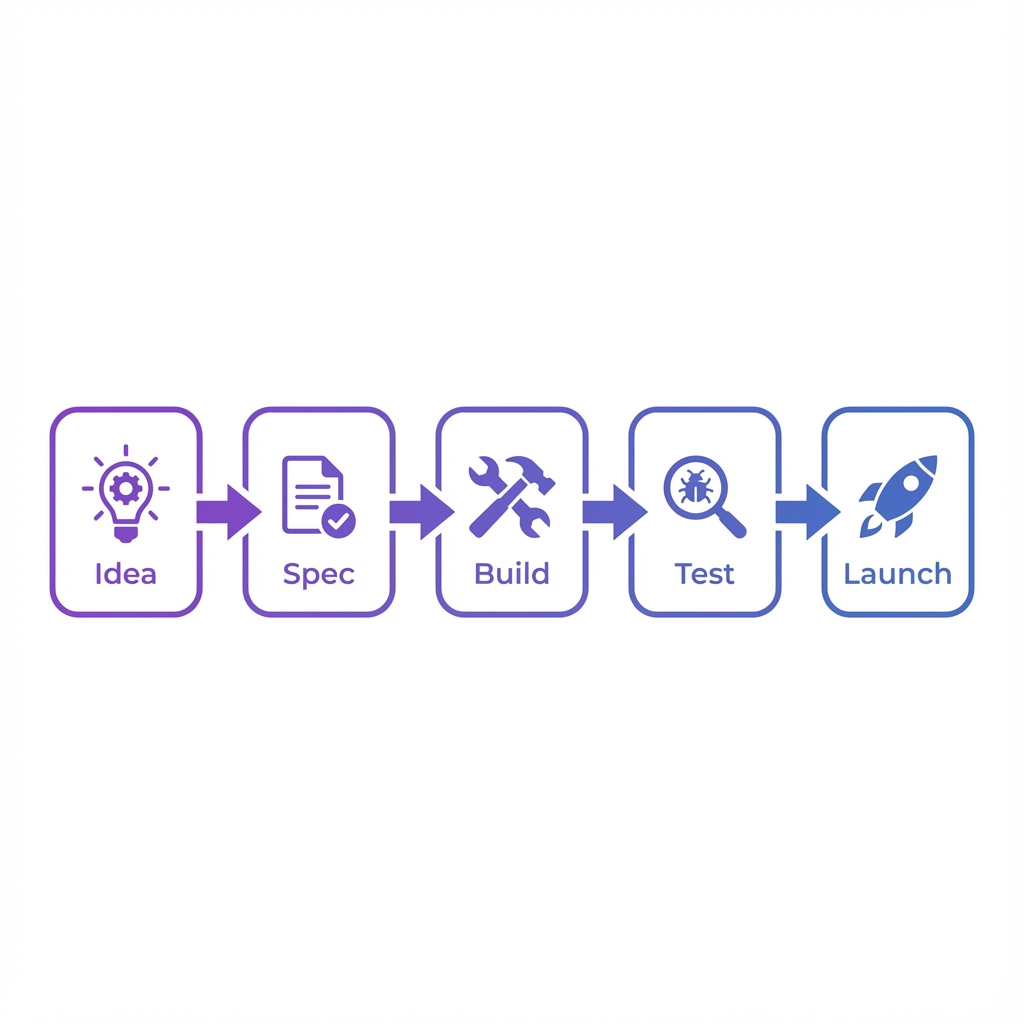
Here's the complete process for how to create an app from scratch, visualized in the modern workflow:
Step 1: Define Your App Idea
Question to answer: What problem does your app solve?
- Write a one-sentence description
- Identify your target users
- List the core problem you're solving
- Define what success looks like
Output: Clear problem statement
Step 2: Research Your Market
Question to answer: Is there demand for this app?
- Research competitor apps
- Interview 10+ potential users
- Analyze app store reviews of similar apps
- Identify gaps in existing solutions
Output: Market validation + competitor analysis
Step 3: Write Your Specifications (Critical)
Question to answer: What exactly will you build?
This is the most important step that most people skip. Create:
- PRD document template - What features to include/exclude
- User flows - How users navigate your app
- Wireframes - Basic layout sketches
- Technical requirements - Platform, integrations, constraints
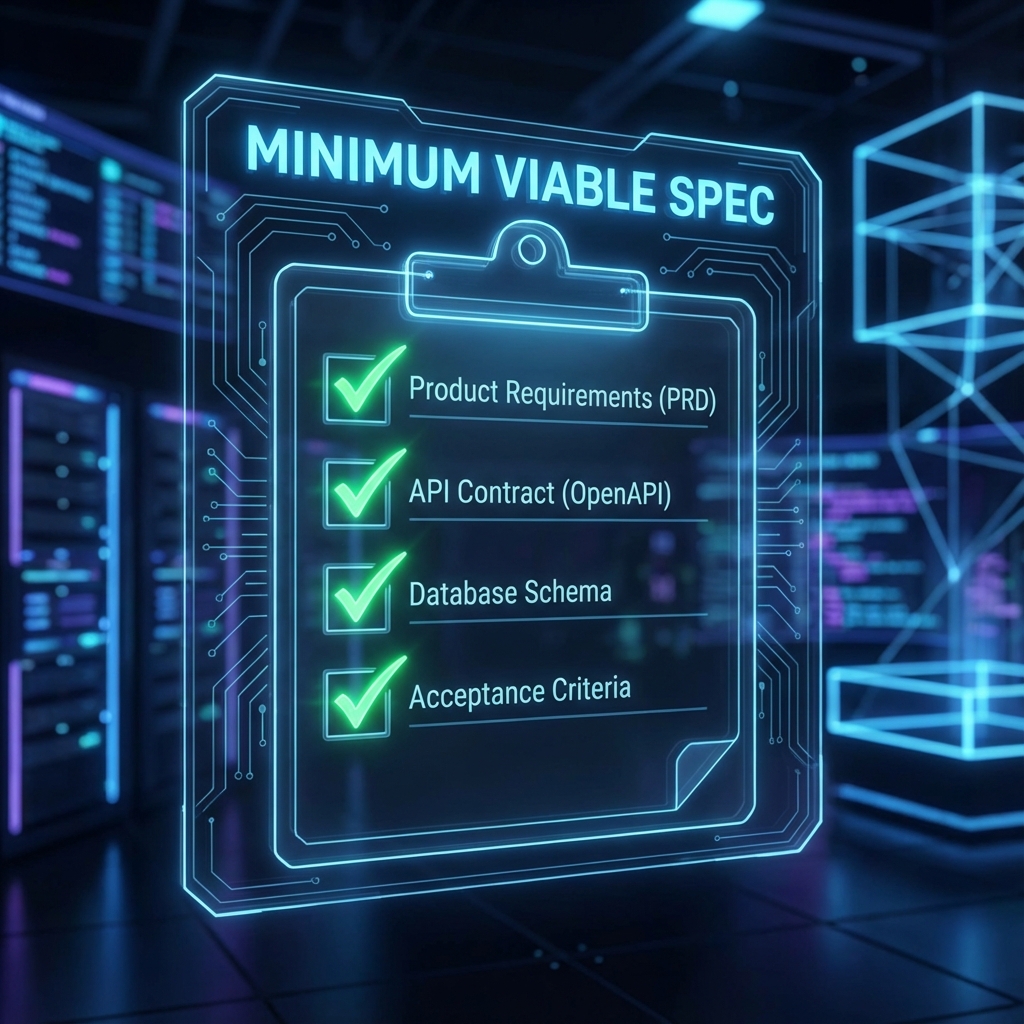
Don't start coding until you have these 4 items defined.
Pro tip: Use Context Ark to generate comprehensive specs automatically. Or start with the free PRD generator. This "Spec Pack" becomes the brain for your AI coding tools.
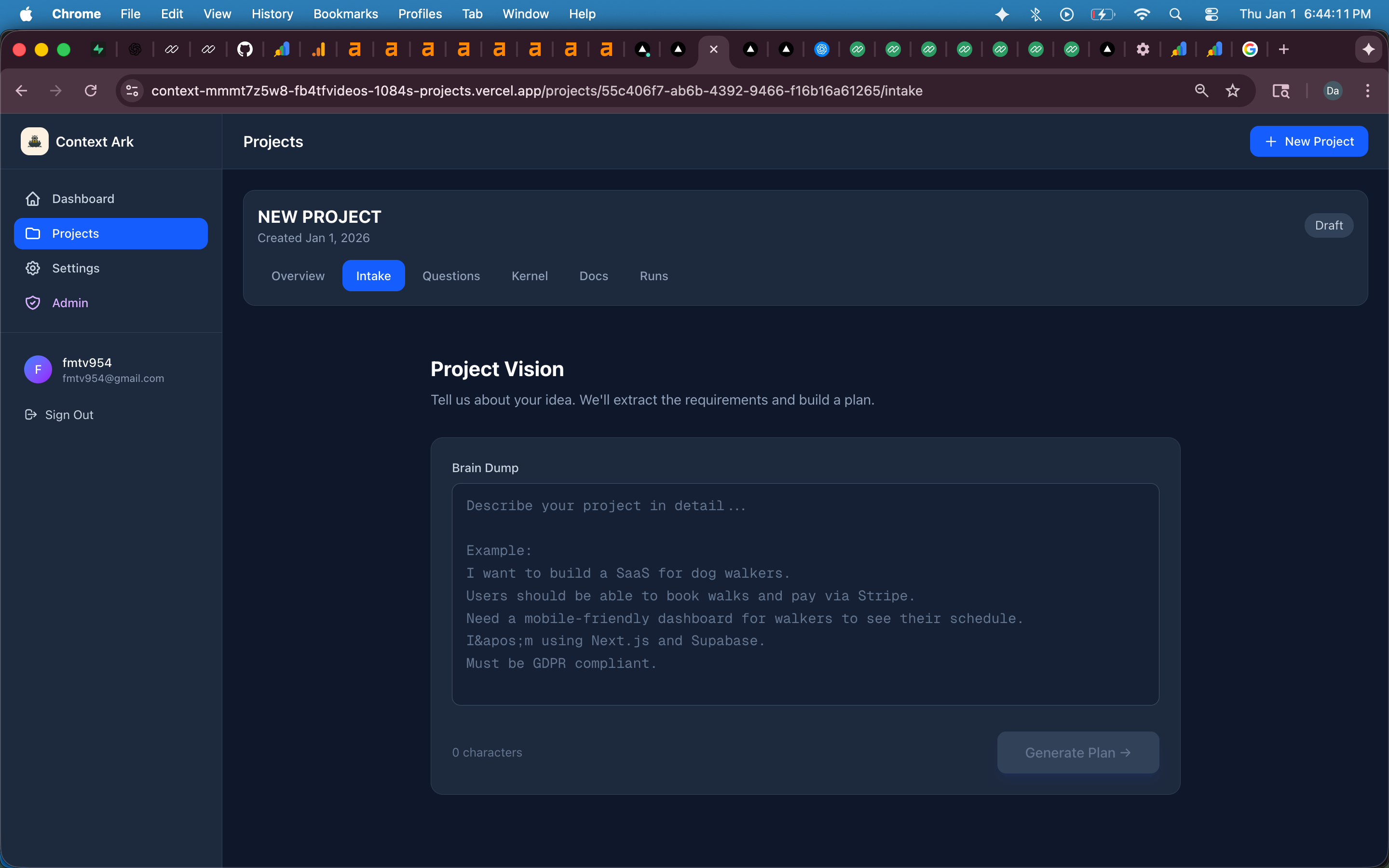
Turn your rough brain dump into structured specifications.
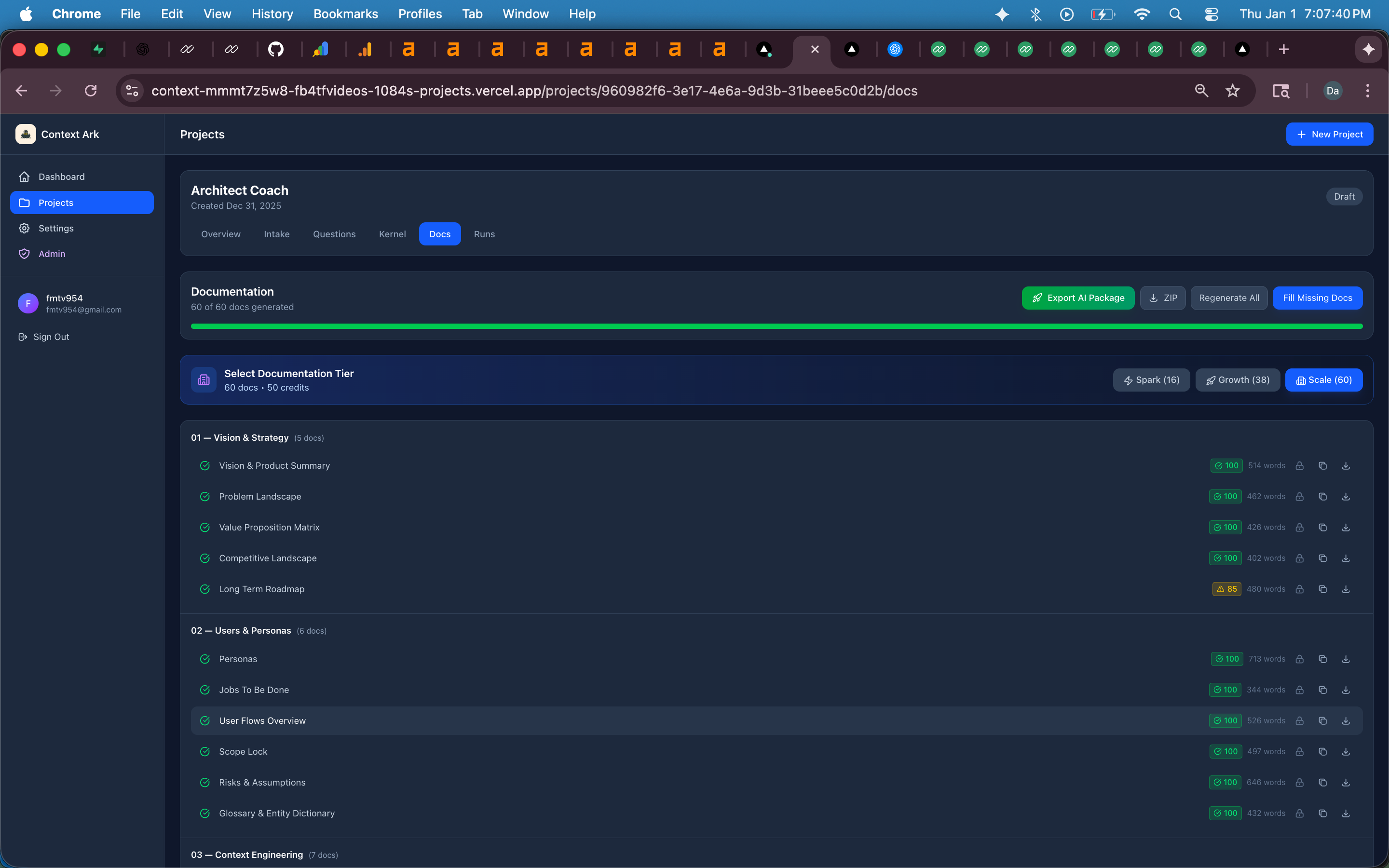
Automatically generated documentation ready for AI coding tools.
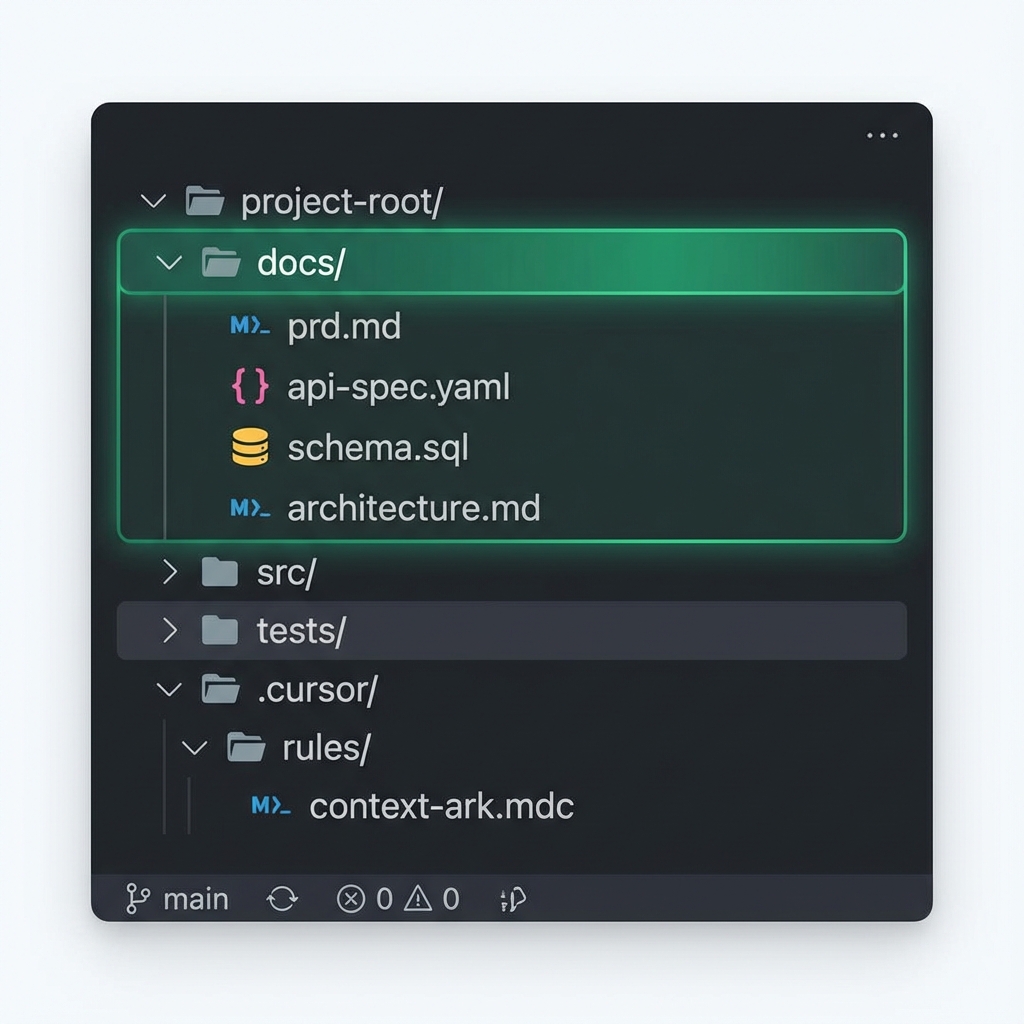
A clean, standardized folder structure prevents "spaghetti code."
Output: Complete specification documents
Step 4: Choose Your Development Method
Question to answer: How will you actually build this?
| Method | Best For | Cost |
|---|---|---|
| No-code (Bubble, Glide) | Non-technical founders | $0-$500/month |
| AI-assisted coding | Technical founders | $0-$50/month + time |
| Freelance developers | Funded startups | $2K-$50K |
| Development agency | Enterprise apps | $50K-$500K+ |
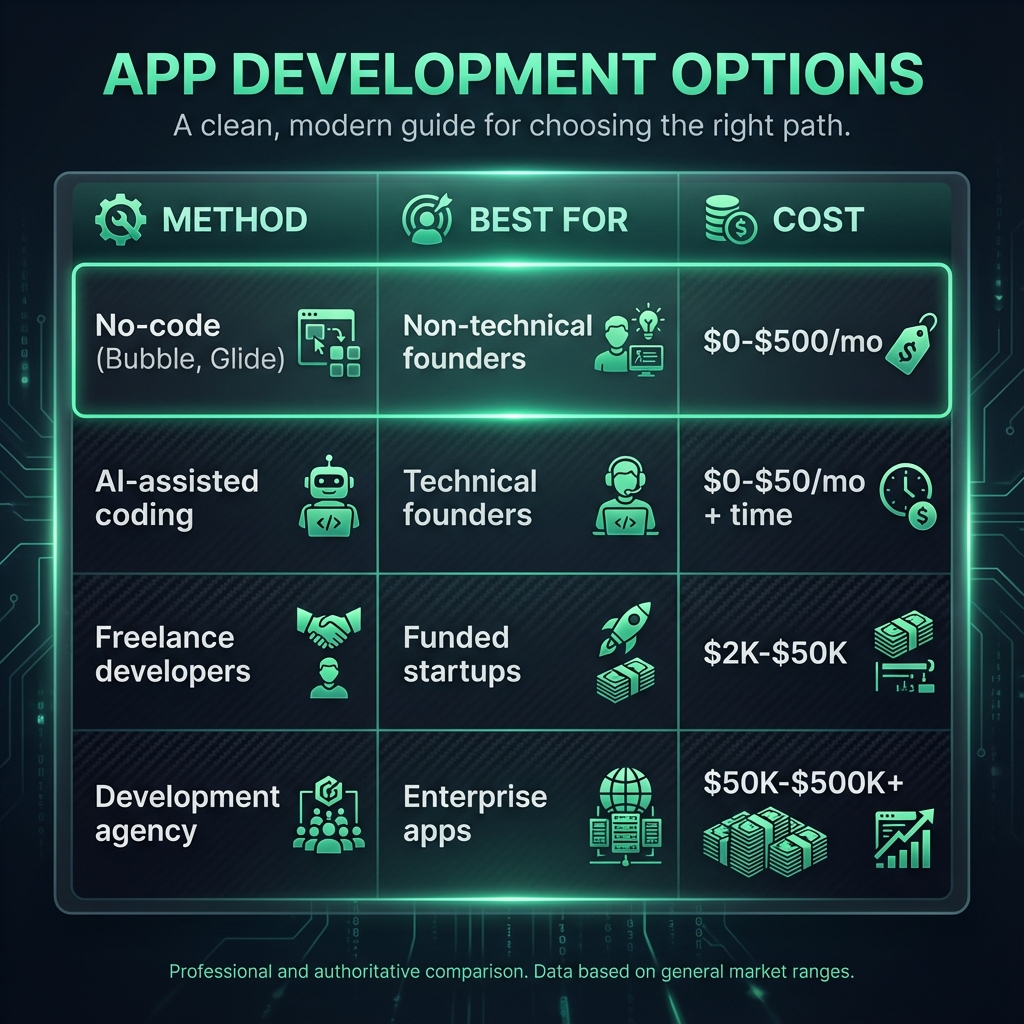
For most founders in 2026, AI-Assisted coding offers the sweet spot of speed and control.
Output: Chosen development approach + tech stack
Step 5: Design Your App
Question to answer: What will users see and interact with?
- Create wireframes (low-fidelity layouts)
- Design high-fidelity mockups
- Build interactive prototypes
- Test designs with real users
Tools: Figma, Sketch, Adobe XD, Canva
Output: Complete UI/UX designs
Step 6: Set Up Your Development Environment
Question to answer: What infrastructure do you need?
- Version control (GitHub)
- Database (Supabase, Firebase, Planetscale)
- Authentication (Supabase Auth, Clerk)
- Hosting (Vercel, Railway, AWS)
Output: Working development environment
Step 7: Build Your MVP
Question to answer: What's the smallest version that delivers value?
Build only the core features:
- 3-5 essential features maximum
- Skip nice-to-haves for later
- Focus on the main user flow
- Use your specifications as your guide
Output: Working MVP (Minimum Viable Product)
Step 8: Test Thoroughly
Question to answer: Does everything work correctly?
| Test Type | What It Checks |
|---|---|
| Unit tests | Individual functions |
| Integration tests | Features working together |
| E2E tests | Complete user journeys |
| User testing | Real people using your app |
| Performance | Speed and responsiveness |
Output: Bug-free, tested application
Step 9: Launch Your App
Question to answer: How do you get your app to users?
For web apps:
- Deploy to Vercel, Netlify, or similar
- Set up custom domain
- Configure analytics
For mobile apps:
- Submit to Apple App Store ($99/year)
- Submit to Google Play Store ($25 one-time)
- Wait for review (24 hours - 2 weeks)
Output: Live application accessible to users
Step 10: Iterate Based on Feedback
Question to answer: How do you improve your app?
- Collect user feedback
- Monitor analytics
- Fix bugs quickly
- Add features based on data
- Regular updates (bi-weekly to monthly)
Output: Continuously improving product
How to Make a Mobile App vs Web App
When learning how to make a phone app, you need to choose your platform.
Platform Comparison
| Factor | Web App | Native Mobile | Cross-Platform Mobile |
|---|---|---|---|
| Development cost | Lower | Higher | Medium |
| Performance | Good | Best | Good |
| App store presence | No | Yes | Yes |
| Install required | No | Yes | Yes |
| Offline capability | Limited | Full | Full |
| Device features | Limited | Full | Most |
| Time to build | Faster | Slower | Medium |
When to Build a Web App
- You want the widest reach
- Budget is limited
- No need for device hardware (camera, GPS, etc.)
- Content-focused application
- You want fast iteration
When to Build a Mobile App
- App store presence is important
- You need device features (push notifications, camera, etc.)
- Performance is critical
- Offline functionality is required
- Your users prefer native experience
When to Build Both
Start with web, then add mobile later—or use cross-platform tools like React Native or Flutter to build once and deploy everywhere.
How Much Does It Cost to Build an Application?
How much does it cost to make an app? Use our free app cost calculator to get a precise estimate, or see the breakdown below:
Cost by Development Method
| Method | Cost Range | Timeline |
|---|---|---|
| DIY with no-code | $0-$500/month | 2-8 weeks |
| DIY with AI tools | $0-$100 + time | 2-6 weeks |
| Hire freelancers | $2,000-$50,000 | 1-6 months |
| Development agency | $50,000-$500,000+ | 3-12 months |
Hidden Costs to Budget For
| Cost | Range | Notes |
|---|---|---|
| Domain name | $10-50/year | Required |
| Hosting | $0-500/month | Scales with users |
| Database | $0-300/month | Many have free tiers |
| Authentication | $0-200/month | Often included |
| App Store fees | $99-125/year | Apple + Google |
| SSL certificate | $0-100/year | Often included with hosting |
| Analytics | $0-100/month | Free options available |
| Marketing | Variable | Often 50%+ of total budget |
Can You Make an App for Free?
Yes, if:
- You build it yourself
- You use free tiers of services
- You deploy as a web app (no app store fees)
- You're willing to invest your time
No, if:
- You want native mobile apps (store fees)
- You need premium features/scale
- You're hiring developers
How Long Does It Take to Develop an App?
Timeline by App Complexity
| App Type | Solo + AI | Small Team | Agency |
|---|---|---|---|
| Simple MVP | 2-4 weeks | 1-2 weeks | 2-4 weeks |
| Medium app | 4-8 weeks | 2-4 weeks | 4-8 weeks |
| Complex app | 8-16 weeks | 4-8 weeks | 8-16 weeks |
| Enterprise | 16+ weeks | 8-16 weeks | 16-52 weeks |
What Speeds Up Development
- Clear specifications - 30-50% faster
- Existing templates - 20-40% faster
- AI assistance - 40-60% faster
- Small initial scope - 50%+ faster
What Slows Down Development
- Unclear requirements - 2-3x longer
- Scope creep - 50-100% longer
- Unfamiliar tech - 30-50% longer
- Poor planning - 2-4x longer
Ways to Create Apps: Your Development Options
Option 1: No-Code Platforms
Best for: Non-technical founders, simple MVPs
Platforms:
- Bubble - Complex web apps without code
- Glide - Turn spreadsheets into apps
- Adalo - Native mobile apps
- Webflow - Beautiful websites with CMS
- Softr - Apps from Airtable/Google Sheets
Pros: Fast, no coding needed, affordable Cons: Limited customization, platform lock-in
Option 2: AI-Assisted Coding
Best for: Technical founders, developers wanting speed
Tools:
- Cursor - AI-first code editor
- Cline - Autonomous AI coding agent
- v0 - UI component generation
- Lovable - Full apps from prompts
- GitHub Copilot - AI pair programmer
Pros: 5-10x faster, handles boilerplate, learns your codebase Cons: Requires some technical knowledge, needs good specs
Option 3: Traditional Coding
Best for: Complex apps, custom requirements
Frameworks:
- Next.js / React - Web apps
- React Native / Expo - Cross-platform mobile
- Flutter - Cross-platform with Dart
- Swift / SwiftUI - iOS native
- Kotlin - Android native
Pros: Maximum control, best performance Cons: Slowest, requires programming skills
Option 4: Hire Developers
Best for: Funded startups, non-technical founders with budget
Where to find:
- Upwork, Toptal (freelancers)
- Dev agencies
- Local developers
- Remote teams
Pros: Professional quality, hands-off Cons: Expensive, communication overhead
The "Spec Pack": Your Secret Weapon
The #1 reason app projects fail (or run over budget) is ambiguity. When you don't know exactly what you're building, you build the wrong thing.
In the AI coding era, this is even more critical. If you give vague instructions to Cursor or Cline, they will hallucinate features, misuse libraries, and create "spaghetti code."
Sample Spec Pack Checklist
Before you write a single line of code (or ask AI to), ensure you have:
- PRD (Product Requirements): The "what" and "why"
- Database Schema: Your data structure
- API Specification: How frontend talks to backend
- UI/UX Flows: User journey maps
- Tech Stack Decision: The tools you'll use
Generate your complete Spec Pack automatically with Context Ark →
How to Code an App (With AI Assistance)
If you want to learn how to code an app, here's the modern approach using AI tools:
The Spec-Driven AI Coding Workflow
graph LR
    A[Idea] --> B[Spec Pack by Context Ark]
    B --> C[AI Code Generation]
    C --> D[Human Review]
    D --> E[Working App]

    style B fill:#d8b4fe,stroke:#9333ea,stroke-width:2px
Why Specifications Matter for AI Coding
Without specs, AI tools:
- Invent features you didn't ask for
- Use wrong database columns
- Create inconsistent patterns
- Add technical debt
With specs, AI tools:
- Build exactly what you need
- Use correct naming conventions
- Follow your architecture
- Produce maintainable code
Example: Building a Todo App with AI
Step 1: Write your spec
I want a todo app where users can:
- Create tasks with title and description
- Mark tasks as complete
- Delete tasks
- Filter by status (all/active/complete)
Step 2: Generate detailed specs with Context Ark
Step 3: Prompt Cursor/Cline
Using @docs/api-spec.yaml and @docs/schema.md,
implement the todo list feature.
Step 4: AI generates working code that matches your specs
How to Design an App That Users Love
Designing an app involves both visual design and user experience:
Design Principles
- Simplicity - Every screen should have one clear purpose
- Consistency - Use the same patterns throughout
- Feedback - Show users their actions had effect
- Accessibility - Design for everyone
- Speed - Perceived performance matters
Design Process
- Wireframe - Low-fi sketches of layouts
- Prototype - Interactive clickable mockups
- User test - Watch real users try your design
- Iterate - Improve based on feedback
- Polish - High-fidelity final designs
Design Tools
| Tool | Best For |
|---|---|
| Figma | Team collaboration, most popular |
| Sketch | Mac users, established |
| Adobe XD | Adobe ecosystem |
| Canva | Quick mockups, non-designers |
| Whimsical | Wireframes and flowcharts |
How to Start an App Project Today
Ready to start an app project? Here's your action plan:
Today (30 Minutes)
- Write a one-paragraph description of your app
- List 3-5 core features (what it MUST do)
- Identify your target user
This Week (2-4 Hours)
- Research 3-5 competitor apps
- Talk to 5+ potential users
- Sketch basic wireframes on paper
- Choose your development method
Next Week (8-16 Hours)
- Generate specifications with Context Ark
- Set up your development environment
- Build your first screen/feature
- Get feedback from one user
First Month
- Complete your MVP
- Get 10+ users testing
- Collect feedback
- Iterate and improve
Common Mistakes When Making Apps
Avoid these when learning how to make an application:
Mistake 1: Building Too Much
Problem: Trying to build everything at once Solution: Start with 3-5 core features only
Mistake 2: Skipping Research
Problem: Building something nobody wants Solution: Talk to 10+ potential users first
Mistake 3: No Specifications
Problem: Unclear what to build, wasted time Solution: Write specs before code. Check your gaps with the Spec Readiness Score.
Mistake 4: Ignoring Feedback
Problem: Building in a vacuum Solution: Get user feedback every week
Mistake 5: Premature Scaling
Problem: Optimizing for millions of users on day one Solution: Build for 100 users first
Mistake 6: Feature Creep
Problem: Constantly adding "just one more thing" Solution: Strict scope and say no often
Step-by-Step Tutorial: Build Your First App
Here's a simplified tutorial for how to create an app from scratch:
Tutorial: Build a Simple Notes App
Tools needed: Cursor or Cline, Supabase (free), Vercel (free)
Step 1: Create Specification
## Notes App

## Features

- Create notes with title and content
- Edit existing notes
- Delete notes
- List all notes

## Tech Stack

- Next.js for frontend + API
- Supabase for database
- Vercel for hosting
Step 2: Set Up Project
npx create-next-app@latest notes-app
cd notes-app
npm install @supabase/supabase-js
Step 3: Create Database
In Supabase:
CREATE TABLE notes (
  id UUID PRIMARY KEY DEFAULT gen_random_uuid(),
  title TEXT NOT NULL,
  content TEXT,
  created_at TIMESTAMPTZ DEFAULT now()
);
Step 4: Build with AI
Prompt Cursor:
Create a notes app with these features:
- List all notes on the homepage
- Create new note button
- Edit/delete existing notes
- Use Supabase for the database
- Use the schema I provided
Step 5: Deploy
vercel
Result: Working notes app deployed in under an hour.
Mobile App Development Tips
Performance Tips
- Lazy load images and components
- Minimize JavaScript bundle size
- Use caching effectively
- Optimize database queries
- Compress assets
User Experience Tips
- Show loading states
- Handle errors gracefully
- Work offline when possible
- Use familiar patterns
- Provide clear feedback
Development Tips
- Use version control from day one
- Write specifications before coding
- Test on real devices
- Get feedback early and often
- Automate deployments
FAQs: How Do You Make an App?
How do I create an app with no coding experience?
Use no-code platforms like Bubble, Glide, or Adalo. These let you build apps by dragging and dropping components. Alternatively, use AI tools like Lovable or v0 that generate code from descriptions.
How do you make your own app for free?
Use free tiers of tools: Supabase (database), Vercel (hosting), and either no-code or AI-assisted coding. For web apps, everything can be free. Mobile apps require app store fees ($99-125/year).
How hard is it to make an app?
Depends on complexity. A simple app takes 2-4 weeks for someone learning. A complex app with real-time features, payments, and user accounts takes 2-6 months. AI tools have made it significantly easier.
How do I make a phone app?
Either: (1) Use cross-platform tools like React Native, Flutter, or Expo to build once for iOS and Android, or (2) Build native apps with Swift (iOS) and Kotlin (Android), or (3) Use no-code tools like Adalo that export to mobile.
How can I create an app from scratch?
Follow the 10-step process: (1) Define idea, (2) Research market, (3) Write specs, (4) Choose method, (5) Design, (6) Set up environment, (7) Build MVP, (8) Test, (9) Launch, (10) Iterate. Start with specifications—use Context Ark to generate them.
How much does it cost to create an application?
$0 to $500,000+ depending on method and complexity. DIY: $0-500. Freelancers: $2K-50K. Agency: $50K-500K+. Most first-time founders can build an MVP for under $1,000 using AI tools.
How long does it take to develop an app?
2-16+ weeks depending on complexity. Simple app: 2-4 weeks. Medium: 4-8 weeks. Complex: 8-16+ weeks. Using AI tools and clear specs can cut this time by 30-50%.
What's the best way to make an app in 2026?
Spec-driven development with AI assistance. Write clear specifications, use Context Ark to generate comprehensive docs, then use Cursor or Cline to build with those specs as context. This prevents AI hallucinations and builds exactly what you need.
Next Steps: Build Your App Today
- Define your idea - What problem are you solving?
- Generate specs - Use Context Ark to create comprehensive documentation
- Choose your method - No-code, AI-assisted, or traditional
- Start building - Your first screen today
- Get feedback - Share with potential users
Ready to build? Generate your app specifications with Context Ark →
Related Guides
- How to Build an App Without AI Hallucinations
- Spec-Driven Development for AI Coding
- Context Ark + Cursor Workflow
- PRD Template for AI Apps
Last updated: January 2026
About Context Ark: Context Ark generates 60+ specification documents from a simple idea description. These specs prevent AI coding tools from hallucinating and ensure you build exactly what you need. Try it free →
Context Ark Team
Writing about AI, documentation, and developer tools
Turn Brain Dumps into PRDs
Don't let AI guess your requirements. Generate a structured PRD with acceptance criteria instantly.